

Lightroom Workshop
Adobe Lightroom Workshop: End-to-End Workflow
Adobe Lightroom is the cornerstone software for digital photographers. It streamlines the complete photographic process: from downloading and cataloging hundreds of captures to non-destructive RAW editing and high-fidelity output for print or online portfolios.
This workshop covers the interface architecture, catalog and folder structures, memory card import, preferences optimization, and full mastery of two essential modules: Library (asset management, keywording, collections) and Develop (tone curves, color grading, HSL, noise reduction).

Adobe Photoshop Lightroom · Professional RAW editing workflow
 #01
02. Preliminary Tips
Before getting started with Lightroom, it is essential to have a very clear photo archiving system and know how our...
 #02
03. The User Interface
The Lightroom user interface is dynamic, intuitive, practical, and visually pleasant, allowing for a highly efficie...
 #03
04. Importing Photos
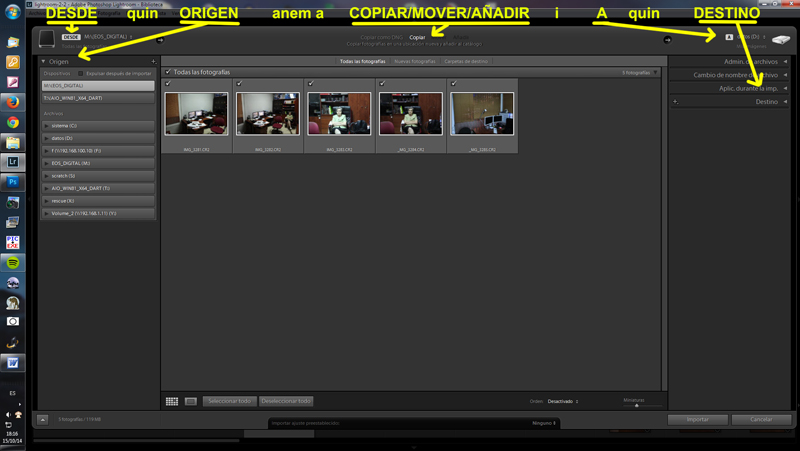
HOW TO IMPORT FROM A CAMERA OR MEMORY CARD. When connecting a camera or SD card reader, Lightroom's import dialog o...
#04
05. Configuration & Preferences
Lightroom provides flexible configuration settings to streamline your photographic workflow and optimize performanc...
 #05
06. Library Module
The Library Module is the command center where we view, cull, rate, organize, and manage our photographs once impor...
 #06
07. Develop Module
The Develop Module is the creative heart of Lightroom, where we process and elevate our images in an entirely non-d...